
What's new in iTicket Apps: October 2026 27-10-26
Point-of-Sale, version 356
Upgrades at the till, and pickups that keep moving
Guests who loved their day can now leave with a season pass, priced at what they already paid. Large group orders get their wristbands faster, printer hiccups no longer stop a sale, and card payments on Nets terminals are more reliable. This release also includes everything from hotfix builds 353 to 355.
Core releaseThe season pass upgrade, web links and the new wristband pickup also need the iTicket core release planned for 29 October 2026. They are marked below.
New in POS
Turn today's visit into a season pass
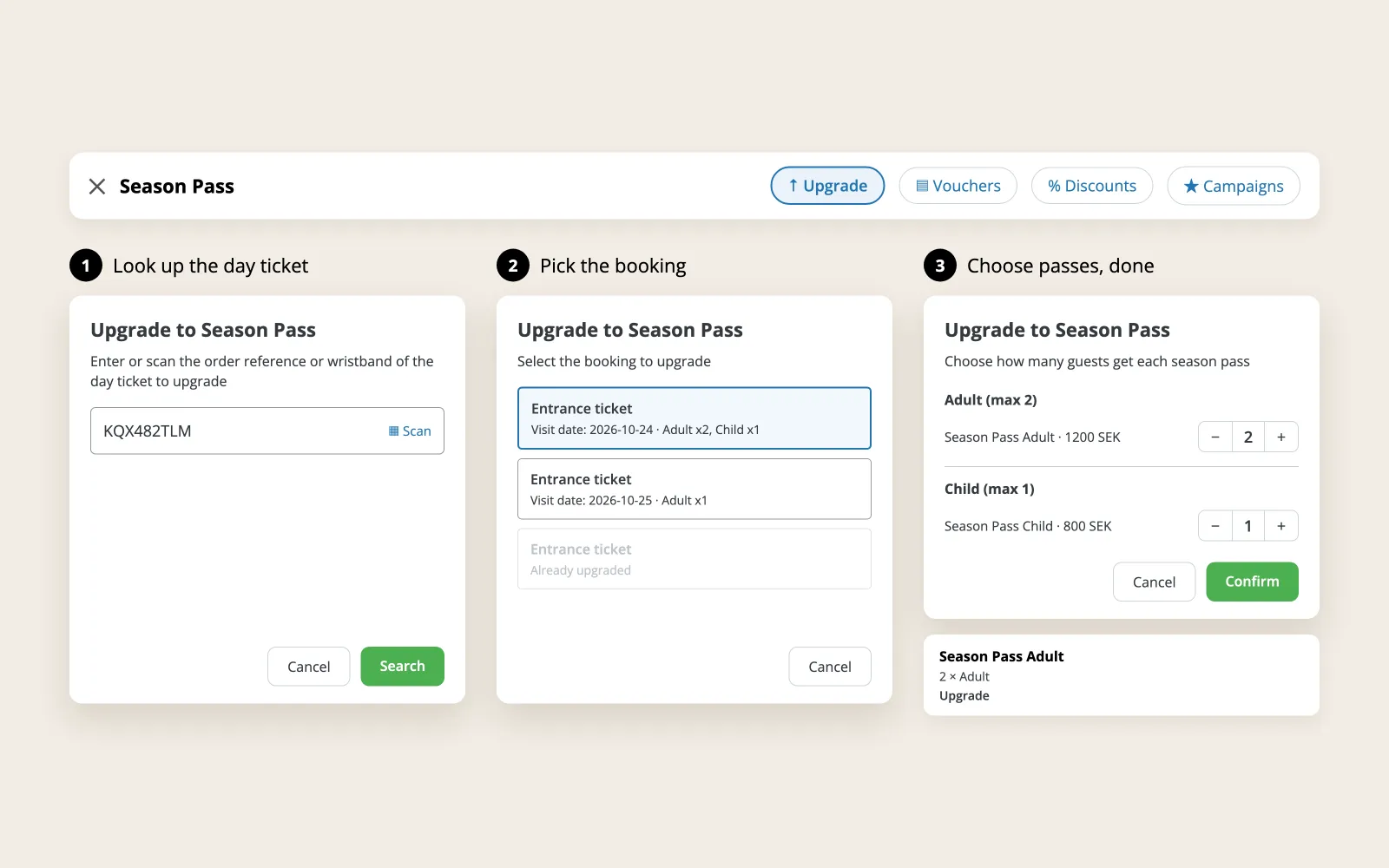
A guest who had a great day can now upgrade right at the till. The cashier looks up the entrance order, picks the booking, and POS prices the season pass at the tier the guest already paid.
- Open the season pass and tap Upgrade
- Enter the order reference and pick the booking
- The season pass lands in the cart, marked as an upgrade on the cart and the receipt
Upgrades are available within 7 days of the visit, once per booking. And for families with several passes, products from all of them can now be redeemed in one checkout.
Core releaseThe upgrade needs the iTicket core release planned for 29 October 2026.
User Stories 64322 and 60689
Reworked
Wristband pickup that keeps up with the queue
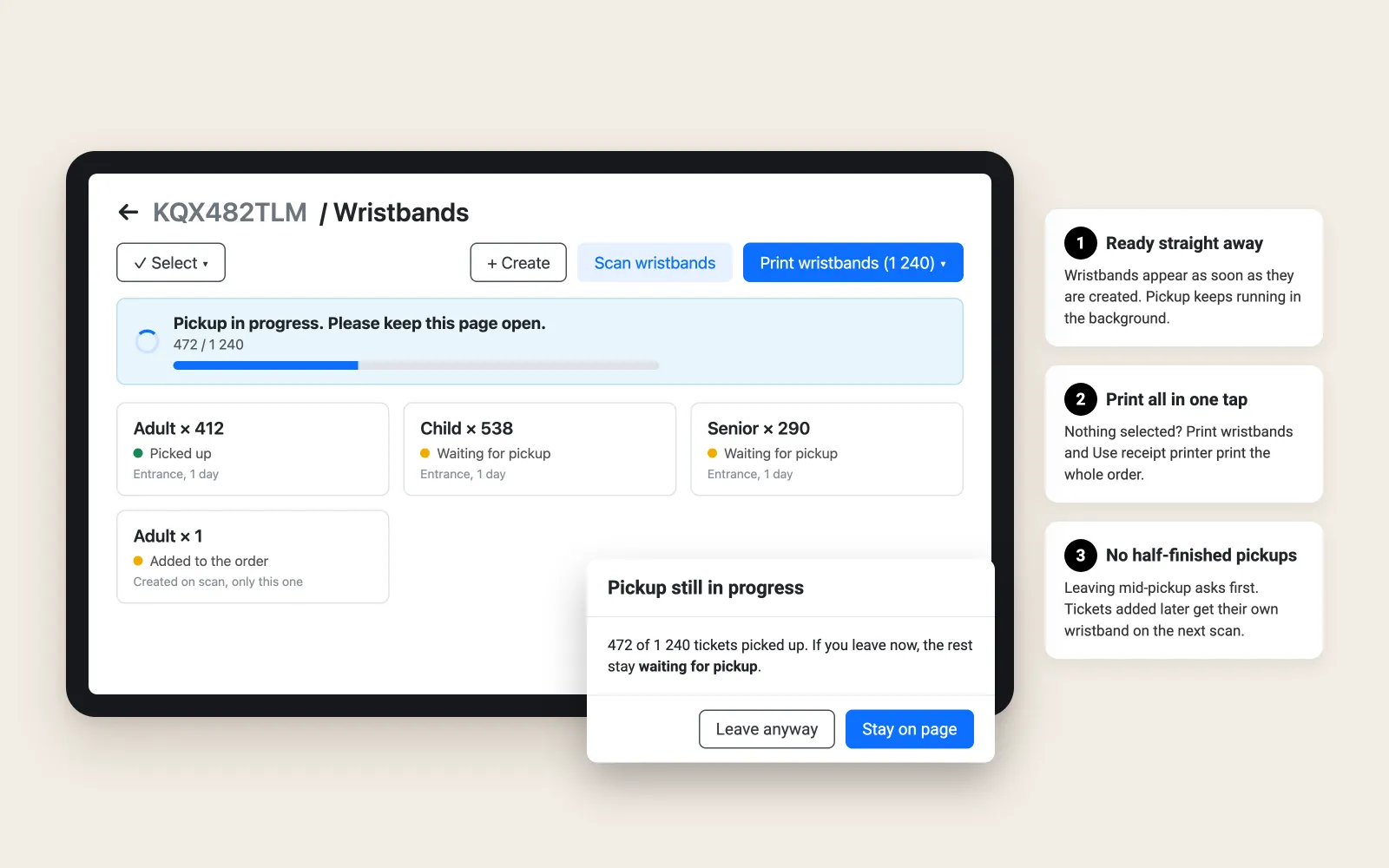
Big group orders no longer hold up the till. Wristbands appear the moment they are created, pickup carries on in the background, and printing covers the whole order in one tap.
- Opening an order for wristband pickup creates the wristbands automatically
- With nothing selected, Print wristbands and Use receipt printer print them all
- Leaving while pickup is still running asks first, so no order is left half done
- Tickets added to the order later get their own wristband on the next scan, and the rest stay as they are
Core releaseNeeds the iTicket core release planned for 29 October 2026.
User Stories 64881, 66638 and 66720, Bug 65526
New in POS
When the printer says no, the sale goes on
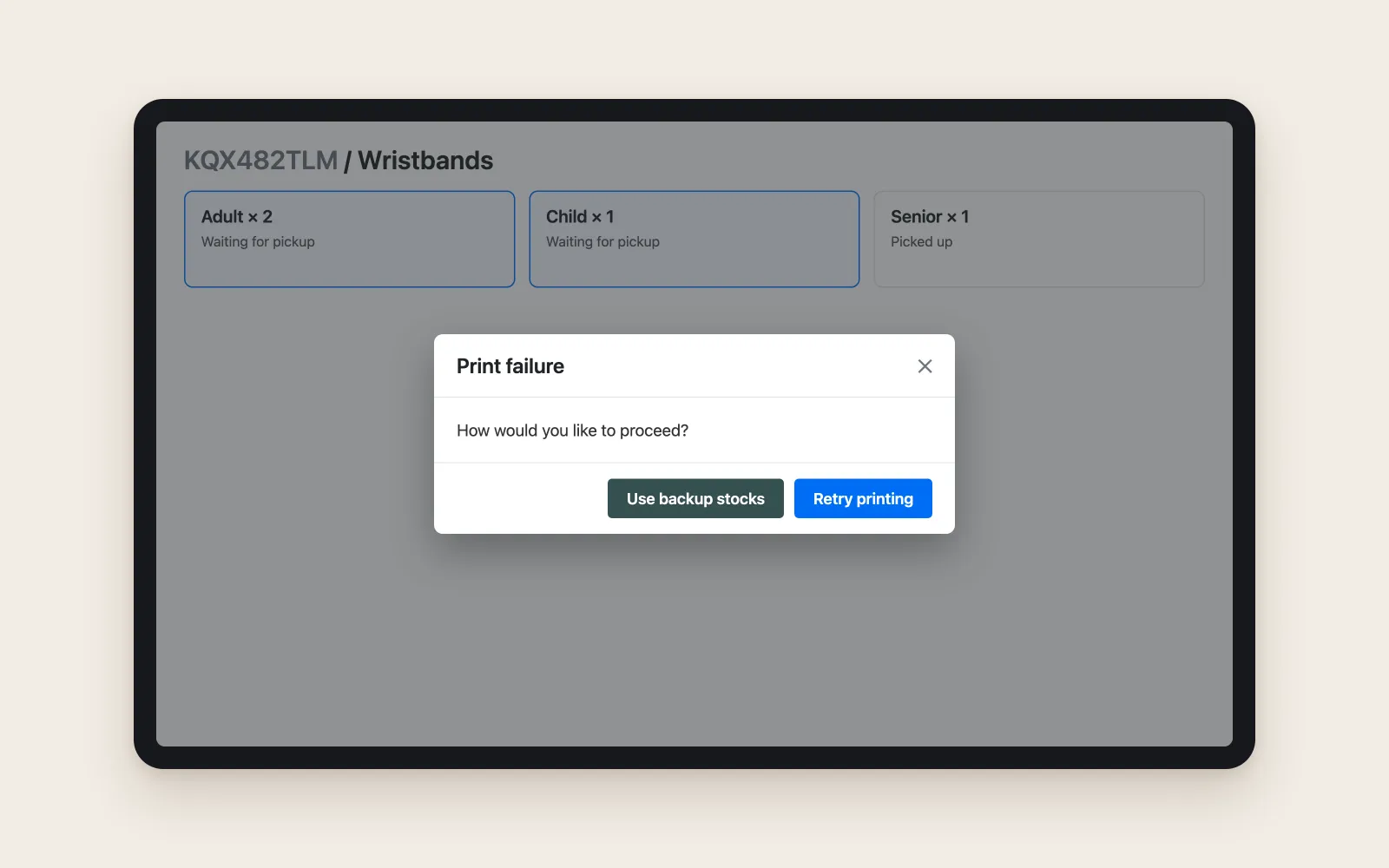
If the wristband printer reports a problem, POS now tells the cashier and offers two ways forward: Retry printing, or Use backup stocks to hand out a wristband from the cashier's personal stock. Pickup completes either way, and the stock summary stays correct.
Products without a wristband template fall back to personal stock too, instead of failing.
User Stories 58795 and 59228, Bugs 61882 and 62660
New in POS
Answers for guests, one tap away
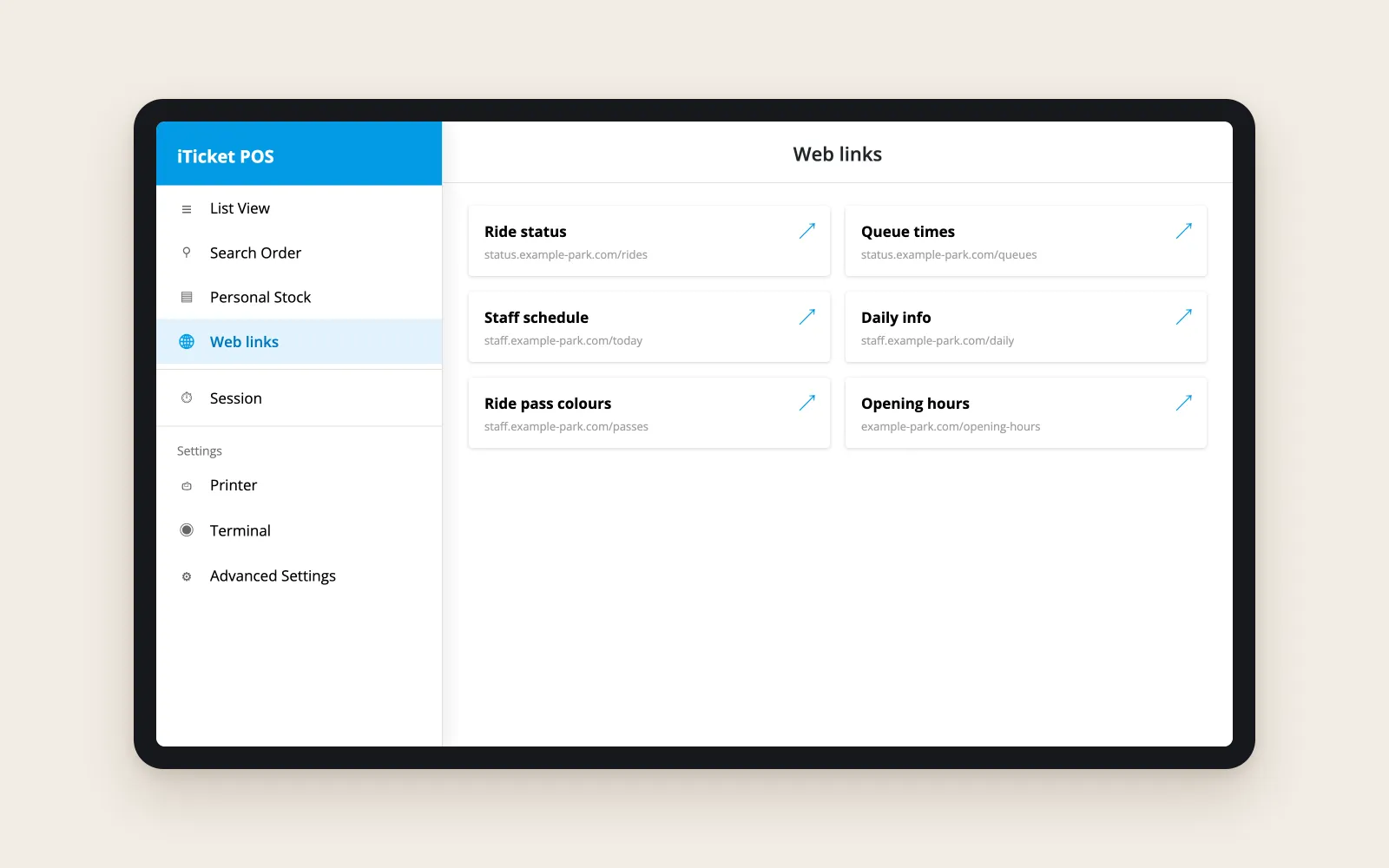
Is the ride open? How long is the queue? Venues can now add their own web pages to the POS menu, such as ride status or staff schedules, so cashiers can answer with confidence without leaving POS.
Links and their labels are set per POS configuration in the Portal, so each department sees what is relevant to it. Session now sits in its own menu section, so it is not tapped by accident.
How to set it up
- In the Portal, go to POS Management > Configurations and open the configuration your registers use
- In the Web links section, click Add
- Enter a Link name, which is what cashiers see, and the URL. The address must start with https://
- Save the configuration. Add as many links as you need, and remove one with the delete icon next to its name
That is all it takes. Registers on POS version 356 show Web links in the menu as soon as their configuration has at least one link, with nothing else to switch on. Pages open inside POS and stay on the website you linked to, so link straight to the page cashiers need.
Core releaseNeeds the iTicket core release planned for 29 October 2026, which adds the Web links section to the Portal.
Feature 60629
Card payments you can count on with Nets
Abort now really aborts. Pressing Abort in POS also cancels the payment on a Nets cloud terminal, so a guest can no longer be charged twice.
- When the outcome is uncertain, POS asks the cashier to check the terminal before trying again
- A terminal busy with another POS now gives a clear message instead of a technical error
- A double tap on the payment button no longer creates an extra cancelled transaction
- The terminal stays connected when POS has been in the background
Bugs 65853, 65854, 65917 and 66580
Everything in this release
The full list for Point-of-Sale version 356, including the fixes delivered in hotfix builds 353 to 355, plus the Self-Service POS and Entry Management updates shipped alongside it. Items marked Core release 29 Oct also need the iTicket core release planned for 29 October 2026.
Point-of-Sale
General Improvements
- User Story 57495: Added scrollbars where a view has more content further down
- User Story 57500: The wristband list in "Scan to connect" now shows a small index number on each row
- Feature 60629: Added configurable web links to the POS menu, so cashiers can open venue pages such as ride status or staff schedules without leaving POS. Links and their labels are set per POS configuration in the Portal, and Session now sits in its own menu section so it is not tapped by accident Core release 29 Oct
- User Story 60688: When redeeming a season pass, POS now only offers products that are part of the register's sales configuration Core release 29 Oct
- User Story 60689: Cashiers can now redeem products from several season passes in a single checkout
- User Story 64322: Cashiers can now upgrade a guest's entrance tickets to a season pass at the till. They enter the order reference, pick the booking, and the season pass is priced at the tier the guest already paid. Upgrades are available within 7 days of the visit Core release 29 Oct
- User Story 65884: The tour list now shows the article name under each tour, with the tour code, vehicle and remark in the expandable details. The From location is preselected from the booking slot's default route
Payments
- Bug 62277: Fixed payment options still showing after a payment was completed or cancelled, which could leave the "New order" button disabled
- User Story 64493: Card purchases on Nets N950 terminals now go through the VISIT payment service
- Bug 65490: Updated the Nets terminal integration, fixing the "Formatfejl" error shown on the terminal
- Bug 65853: Pressing Abort in POS now also cancels the payment on Nets cloud terminals, so the order can no longer be charged twice. When the outcome is uncertain, POS now asks the cashier to check the terminal before taking the payment again
- Bug 65854: Pressing the payment button twice on a Nets cloud terminal no longer creates an extra cancelled transaction
- Bug 65917: Fixed the Nets terminal losing its connection after POS had been in the background for more than a minute
- Bug 66580: When a Nets cloud terminal is busy with another POS, the cashier now gets a clear message instead of a technical error, and the order is no longer blocked as "Payment status unknown"
Pickup, Printing and Wristbands
- Bug 57578: Pick up and print no longer picks up the entrance ticket in a bundle, only the articles meant for pickup
- User Story 58795: When the wristband printer reports an error, POS now shows a dialog with "Retry printing" and "Use backup stocks" options
- User Story 59228: If wristband printing fails, pickup can now be completed from the cashier's personal stock
- Bug 60588: Restored the sorting of contents in the wristband view
- Bug 61882: Fixed an incorrect stock summary after a fallback pickup from personal stock
- Bug 62639: Fixed a conflict between the wristband printer and the receipt printer when both are connected
- Bug 62646: Fixed the BOCA wristband printer reporting false failures after it was switched off and on
- Bug 62660: When a product has no wristband template, pickup now falls back to personal stock instead of failing
- Bug 63015: Fixed the pickup dialog going blank when its web view stopped responding
- Bug 63017: Fixed pickups being registered twice for every article
- Bug 63018: Fixed a second tap on "Pick up and print" registering extra pickups on large orders
- Bug 63021: Season pass check-in is now blocked when the register's location has no valid check-in configuration
- User Story 64881: Improved the wristband view: it shows how many wristbands and external IDs the order has, scrolls to a scanned wristband, lets cashiers exit selected wristbands, and sorts documents by tour date and time. Opening and changing purchase credit is also clearer
- Bug 65078: Fixed POS crashing when printing without a connected printer
- Bug 65089: Wristbands for products not mapped in the old wristband setup now print using the check-in configuration's default template
- Bug 65315: Fixed automatically created wristbands sometimes missing their participant details
- Bug 65526: Tickets added to an order after its wristbands were created can now be picked up and checked in, and the single-ticket Pickup button works again Core release 29 Oct
- Bug 65574: Removed swipe-to-delete on wristbands to prevent accidental removal
- Bug 66037: Fixed scanning a single document onto a wristband failing
- Bug 66239: Fixed a crash that could follow a failed print
- User Story 66638: Wristbands now appear as soon as they are created while pickup continues in the background, and cashiers are asked to confirm before leaving while pickup is still running. Scanning the order again creates wristbands only for tickets added since Core release 29 Oct
- User Story 66720: Opening an order for wristband pickup now creates the wristbands automatically, and "Print wristbands" and "Use receipt printer" print all wristbands when none are selected Core release 29 Oct
Bug Fixes
- Bug 55326: Fixed merchandise showing as expired in POS while still awaiting pickup
- Bug 63651: Fixed being unable to refund a self-service POS purchase that included used or picked-up tickets
- Bug 63652: A manual search for a product voucher now opens the voucher view instead of the order view
- Bug 64994: Fixed order search crashing when no order was found
- Bug 65007: Fixed an incorrect price summary when adding or removing participants on tour add-ons
- Bug 65009: Vouchers show the Used status again
- Bug 65712: The value voucher panel now shows the order reference Core release 29 Oct
- Bug 65891: Fixed a crash when increasing an add-on past its per-participant limit
- Bug 66251: Fixed a crash when returning to the session screen
- Bug 66253: Fixed a crash that could occur when clearing the cart
- Bug 66308: The credit overview now shows a total of 0 once every item on a transaction has been refunded
- Bug 66399: Fixed an error in the pickup view for tickets with certain validity dates
- Bug 66641: Fixed a crash in the product options view
Self-Service POS
- Bug 63317: Fixed the self-service POS restarting itself after 15 to 30 minutes idle on the product screen
- User Story 65640: Updated the Nets terminal integration to the latest version
Entry Management
- User Story 64380: Added scanner support for the SM24 device
- Bug 55423: Corrected the wording of the network error message